Understanding AR Work Instructions
Paper manuals and static PDFs have been the default way to deliver procedures for decades. They're familiar, easy to print, and simple to distribute. But field work has changed significantly. Assets are more complex, teams are leaner, downtime is more expensive, compliance expectations are higher, and workforces are more dynamic than ever before.
The fundamental problem with paper is not that it's old-fashioned. The issue is that paper manuals were designed to describe a process, not to support execution in real time. Field work is spatial, procedural, and often safety-critical. Workers need guidance that is immediate, contextual, and verifiable, not a document that assumes perfect conditions and unlimited time.
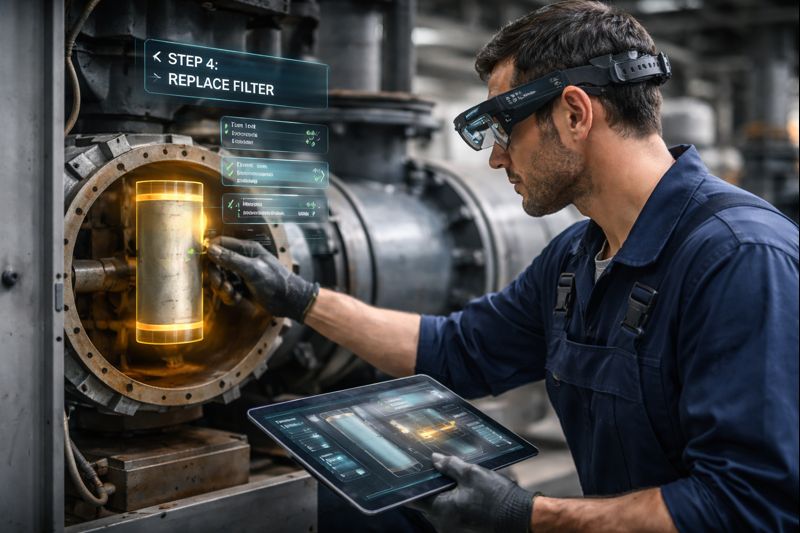
Augmented reality work instructions, often called AR work instructions, replace traditional reference documentation with real-time performance support. Instead of asking a technician to interpret a manual and translate it into action, AR instructions guide the task where it's happening. The guidance appears directly on the equipment, at the point of work, with steps designed for execution and traceability.
What AR Work Instructions Are
AR work instructions are digital, context-aware, step-by-step procedures delivered through mobile devices or head-mounted displays. They overlay guidance directly onto equipment and environments, turning procedures into an interactive workflow that can validate completion and capture proof of work. This technology is increasingly used in industries like mining, construction, manufacturing, utilities, logistics, and field service because it improves consistency, reduces errors and rework, shortens training time for new workers, and supports compliance with audit-ready records.
An AR work instruction system combines three core elements. First, it contains the procedure content itself, including the steps, checks, warnings, required tools, and acceptance criteria. Second, it provides context by identifying which specific asset, configuration, site, job, and procedure version applies to the current task. Third, it enables interaction and validation through confirmations, evidence capture like photos or measurements, and completion records that prove the work was done correctly.
Unlike a traditional manual, AR instructions are anchored to the physical world. Steps can appear next to the component being referenced, overlays can highlight exactly what to touch or inspect, and animations can demonstrate motion, direction, torque sequences, or assembly order. The system might use step-by-step overlays that guide sequence and show what to do next, object-anchored callouts that label specific parts like valves or access panels, or conditional branching that changes the procedure path based on inspection results or readings.
It's important to understand what AR work instructions are not. They are not simply a PDF displayed in augmented reality. If the user still has to scroll through pages and interpret diagrams, the system hasn't improved the workflow, it has only changed the display. AR work instructions are also different from remote assistance, which provides live video support from an expert, and from VR training, which offers simulated practice in a virtual environment. While AR instructions may connect to digital twins, which are virtual representations of physical assets, they are not the same thing.
Why Paper Manuals Fall Short
Paper instructions are typically static and linear. They represent the ideal version of a procedure, written in a quiet office environment. Field work rarely looks like that. Workers must constantly translate the document into reality by interpreting text, mapping diagrams to physical components, and adjusting for site conditions. This creates a hidden burden where the worker is doing two jobs at once: performing the task and mentally converting a document into an executable plan. That mental translation is where errors happen, especially during maintenance, fault finding, and emergency procedures where time pressure and risk are highest.
Even a well-written manual becomes hard to use when the environment is working against the worker. Poor lighting makes text and diagrams harder to read. Dust, grease, and safety gloves make page flipping and touchscreens difficult. Noise and distractions reduce focus and make detailed explanations ineffective. Time pressure increases when downtime costs money or a crew is waiting on task completion. Safety risks escalate when mistakes can damage equipment or harm people. These constraints are not edge cases. They are the normal operating conditions for field work.
How AR Work Instructions Function
An AR work instruction system needs to do more than render visuals. It must reliably deliver the right procedure at the right moment, work under field conditions, and create an auditable record of what happened. In the field, the system needs a reliable way to know which asset or job the worker is dealing with. Common approaches include QR codes or visual markers placed on assets or work areas, object recognition that identifies equipment via camera-based detection, location-based activation in defined zones, or job selection from a task list pulled from existing systems like CMMS or EAM platforms.
The simplest AR instructions are linear, moving from step 1 to step 2 to step 3. But many field procedures aren't linear. They contain inspection points, decision branches, and safety gates. A well-designed AR workflow supports sequential steps with clear completion criteria, branching logic based on inspection results or measured readings, mandatory confirmations for critical steps like lockout and tagout procedures, and embedded warnings positioned at the exact step where risk is present rather than buried in introductory sections.
AR instructions must match the worker's reality. There are two dominant interaction models. Handheld devices like tablets and phones are common and accessible with lower adoption friction, but they can tie up one hand during work. Hands-free headsets are better for two-handed tasks, but may introduce comfort, safety, or policy constraints depending on the work environment. Many organizations start with handheld devices for initial pilots, then expand to headset use in specific procedures where hands-free operation creates a clear productivity or safety advantage.
Field connectivity is unreliable in many sites, especially remote operations and industrial facilities. AR work instruction platforms should be designed with offline-first behavior. This means instruction sets are cached and stored locally on the device. Completion logging doesn't require real-time network access. Evidence like photos, readings, and signatures sync when connectivity returns. This ensures work can continue even when network access is unavailable.
Safety and Risk Reduction
In high-risk environments, consistency matters as much as competence. AR instructions reduce risk by making the correct action easier to execute than the incorrect one. Visual confirmation highlights the exact valve, panel, or fastener to interact with, reducing the chance of working on the wrong component. Sequence enforcement prevents skipping steps that exist for safety rather than convenience. Reduced cognitive load means less mental translation and fewer mistakes under pressure.
Safety controls can be embedded directly into the workflow. PPE checks can occur at the start of a workflow and again at critical points. Lockout and tagout verification can require mandatory confirmation or evidence capture before proceeding. Hazard awareness warnings appear at the exact step where risk is present rather than in a general safety section that might be skipped. Stop points force a pause before high-consequence actions. The goal is not to automate safety but to make safe behavior the default path during execution.
Knowledge Capture and Workforce Continuity
Many organizations depend on a small number of highly experienced people who simply know how things are done. That knowledge is valuable and fragile. Procedures often exist informally rather than in documentation. Work quality varies by crew, site, or individual. Retirement and turnover create capability gaps that are difficult to fill quickly.
AR instructions can be built from recorded expert workflows. This doesn't mean filming a job and calling it done. It means extracting the expert's decision points, tool choices, and risk checks and turning them into a standardized, repeatable procedure. Best practices become the standard way of doing things. Procedures don't drift over time or vary between locations. Less experienced staff can execute work at higher quality levels without constant supervision. The knowledge that used to exist only in people's heads becomes part of the system.
Data and Continuous Improvement
Paper manuals generate no operational data. AR workflows do, and that unlocks continuous improvement. Organizations can measure step timing to identify where procedures slow down, track common error points where mistakes tend to happen, monitor rework frequency to see which jobs repeatedly fail acceptance criteria, and log procedure deviations where steps are frequently skipped or repeated.
This data improves operations over time. Steps that are unclear or frequently misunderstood can be refined. Training needs can be identified based on real performance rather than assumptions. Performance can be compared across teams and sites to reduce variability. Documentation improves based on actual usage patterns rather than guesswork. Procedures evolve from documents people are expected to follow into systems that are actively optimized.
Where ROI Appears
The strongest business cases for AR work instructions are typically operational rather than cosmetic. ROI tends to appear in a few consistent areas. Operational gains include reduced downtime through faster diagnosis and more consistent maintenance execution, faster task completion with less searching and fewer pauses for clarification, lower error rates from fewer incorrect installations or wrong-component interactions, and reduced rework through improved first-time fix rates and fewer repeat callouts.
Training and workforce savings come from shorter onboarding as new workers reach competency faster, reduced shadowing time as experts spend less time repeating the same guidance, and scalable knowledge delivery where best practices are available everywhere rather than only where experts are located. Safety and compliance value appears through improved procedural adherence as safety steps are embedded and enforced, audit-ready records where proof of work becomes a byproduct of execution, and reduced liability exposure with fewer gaps when investigating incidents.
Common Implementation Mistakes
AR doesn't replace skilled workers. It reduces variability. Skilled workers still make judgments and handle edge cases. AR supports execution and ensures that critical steps aren't missed, especially under pressure. Many valuable AR workflows use lightweight overlays, callouts, photos, and simple animations. High-fidelity 3D models help in some scenarios, but they aren't required for impact. Tablets and phones can deliver strong outcomes, especially for early deployments. Headsets are most valuable when hands-free operation is critical and when site policy and ergonomics allow.
AR instruction projects often fail for predictable reasons. Overengineering occurs when teams try to build a perfect platform instead of solving one specific workflow first. Poor content design happens when instructions are written like a manual rather than an executable workflow. Ignoring field realities like lighting, gloves, offline conditions, and device durability leads to systems that work in the lab but fail on-site. Having no ownership model means nobody is responsible for keeping procedures current as equipment or standards change. Operating without measurement means success is declared without baseline metrics and post-rollout validation.
Implementation Considerations
Successful deployment is less about getting AR working and more about designing a system that fits your operations. Content creation and maintenance requires SME involvement to ensure procedures reflect real workflows rather than idealized versions. Modular design with reusable steps and components reduces duplication and maintenance burden. Governance through approval workflows, versioning, and change control is essential. Clear ownership defines who updates procedures when equipment or standards change.
Hardware selection depends on use case and environment. Tablets offer accessible and rugged options that are easy to pilot. Phones are convenient but screen size and durability can be limiting. Headsets provide hands-free benefits but require consideration of comfort, safety policies, and environmental suitability. Environmental durability matters for handling dust, impacts, rain, and glove-friendly interactions. Battery life must support long shifts with practical charging strategies.
IT, security, and integrations require planning. Device management includes MDM policies, app deployment, and access control. Data handling determines where evidence is stored and who can access it. Network constraints drive offline-first requirements and sync schedules. Integrations connect AR systems to CMMS, EAM, LMS, and ERP platforms so instructions fit existing processes rather than creating new workflows.
Industry Applications
In mining, AR work instructions support equipment maintenance and inspections with high safety requirements, shutdown and startup procedures where sequence is critical, and consistent execution across remote sites with variable experience levels. In construction, they guide installation sequencing and quality checks on-site, commissioning steps with evidence capture like photos and measurements, and reduce rework by guiding correct placement and validation. In manufacturing, AR instructions support changeovers where speed and accuracy directly affect throughput, preventative maintenance with standardized acceptance criteria, and quality checks integrated into the workflow instead of being an afterthought.
The Future of Work Instructions
The next evolution of work instructions is not just more AR but more intelligence and more validation. Emerging capabilities include AI-assisted authoring that turns existing standard operating procedures and expert recordings into structured workflows faster. Computer vision validation confirms the correct component, orientation, or installed part automatically. Sensor-driven steps advance or branch procedures based on real-time readings and conditions. Digital twin connections use asset state and configuration to deliver the correct procedure version for each specific piece of equipment.
The long-term direction is clear. Work instructions are becoming a dynamic support system rather than a static document. They adapt to conditions, validate execution, capture evidence automatically, and improve continuously based on real performance data.
Getting Started
The best way to adopt AR instructions is not to attempt a massive rollout immediately. Start small with one task, one asset type, or one site. Select a high-value workflow that is frequent, error-prone, or safety-critical. Define success metrics like time to complete, error rate, rework rate, or training time reduction. Build a pilot instruction set optimized for clarity and execution rather than fancy visuals. Test in real conditions including poor lighting, PPE requirements, noise, gloves, and offline scenarios. Iterate and scale only after the workflow is proven and maintainable.
Paper manuals were built for a world where procedures were simpler, teams were more stable, and the cost of variability was lower. In modern field operations, the risks of misunderstanding, skipped steps, and outdated documentation are too high. AR work instructions shift procedures from passive reference material into active execution support with contextual guidance, embedded safety, verifiable completion, and measurable performance. The technology is proven. The question is not whether AR work instructions will become standard but how quickly organizations will adopt them to stay competitive.